Absolute Hyperlink HTML Guide for Better Website Navigation
Mastering Absolute Hyperlinks: The Foundation of Seamless Website Navigation
In the digital landscape, a website’s ability to guide its visitors efficiently is very important. Just like road signs on a highway, hyperlinks are the crucial navigational tools that lead users from one page to another, both within a site and across the web. While various types of links exist, understanding and properly implementing absolute hyperlinks stands as a fundamental skill for anyone involved in website creation or management. These precise pointers are not just technical details; they are the foundation of a clear, reliable, and user-friendly online experience, directly impacting how visitors interact with your content and how search engines understand your site’s architecture.
What Exactly Are Absolute Hyperlinks?
An absolute hyperlink is a complete and clear web address (URL) that specifies the exact location of a resource on the internet. Think of it as a full street address, including the city, state, and zip code, ensuring that the mail reaches its destination no matter where it was sent from. This is very different from relative hyperlinks, which are like local directions – they only make sense from a specific starting point.
An absolute link always includes:
- The protocol:
http://orhttps://(secure hypertext transfer protocol). Thehttpsprotocol is now the standard for security and trust. - The domain name:
www.example.com(the unique name that identifies a website). - The full path:
/folder/page.html(the specific location of the file or resource on that domain).
For example, https://www.yourwebsite.com/about-us/team.html is an absolute hyperlink. It will always direct to the ‘team’ page within the ‘about-us’ section of ‘yourwebsite.com’, regardless of which page the user is currently viewing.
Why Absolute Links Are Essential for Better Navigation
The strategic use of absolute hyperlinks offers several key advantages that contribute to superior website navigation and overall performance.
Dependability: Absolute links offer solid dependability. They point to a specific destination clearly. This means users will always land on the intended page, even if they encounter the link outside your website, such as in an email, a social media post, or another site’s content. This reliability prevents frustrating “page not found” errors that can arise when relative links are used out of context.
Boost for Search Engine Optimization (SEO): Search engines like Google crawl the web by following links. Absolute links provide clear, complete signals to these crawlers about your site’s structure and the location of your content. This clarity helps search engines accurately index your pages, understand their relationships, and assign appropriate authority. When your content is shared, absolute links ensure that link equity (the value passed through links) correctly points back to your original site, enhancing your SEO efforts. A consistent URL structure powered by absolute links helps in avoiding duplicate content issues and consolidates ranking signals. Effective linking is crucial for how search engines interpret content; for more details on this, you might review guides on how search engines value website ranking factors.
Smooth External Linking: When you need to direct your visitors to resources on other websites – perhaps to a news article, a research paper, or a partner’s page – absolute links are the only option. They ensure that your users can effortlessly leave your site and arrive at the correct external destination.
Effective Content Sharing: In today’s interconnected digital world, content often gets shared across platforms. If someone copies a paragraph from your blog post that contains a relative link, that link will likely break when pasted elsewhere. Absolute links, however, remain fully functional, preserving the integrity of your content and user experience, no matter where it travels. This ensures that the value of your content persists beyond your site’s boundaries.
Implementing Absolute Hyperlinks in HTML
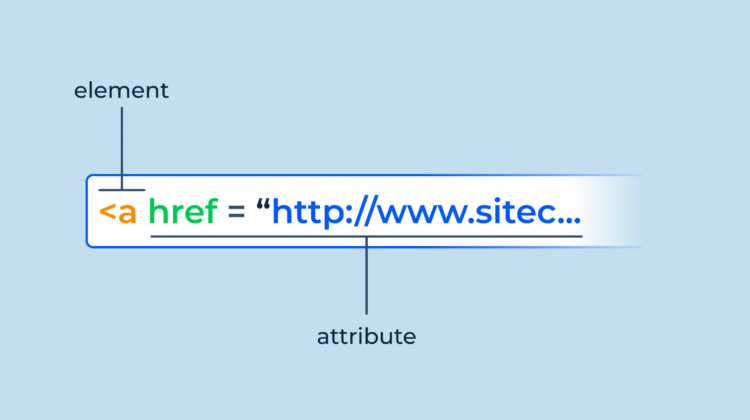
The syntax for creating an absolute hyperlink in HTML is straightforward, primarily utilizing the <a> (anchor) tag.
Here’s the basic structure:
<a href="https://www.example.com/your-page.html">Descriptive Anchor Text</a>hrefattribute: This is where you place the full, absolute URL of the target page.- Anchor Text: The visible text that users click. It should be descriptive and relevant to the linked content, offering a clear expectation of what lies beyond the click. For links pointing to external sites, it’s often good practice to include
target="_blank"to open the link in a new tab, preventing users from leaving your site entirely.
Example:
<p>Learn more about our <a href="https://www.yourcompany.com/services/web-design.html">web design services</a>.</p>
<p>Visit our partner's <a href="https://www.partnerwebsite.net" target="_blank">online store</a> for related products.</p>
Best Practices for Effective Absolute Linking
To truly use the power of absolute hyperlinks, consider these best practices:
- Consistent URL Structure: Maintain a logical and consistent URL structure across your entire website. This makes it easier for both users and search engines to understand and navigate your content.
- Descriptive Anchor Text: Always use anchor text that accurately describes the destination of the link. Avoid vague phrases like “click here.” Good anchor text improves accessibility and helps SEO.
- Regular Link Checks: Broken links – links that lead to non-existent pages – severely damage user experience and SEO. Implement a routine to check for and fix broken absolute links.
- Prioritize HTTPS: Always use
https://in your absolute links. This ensures a secure connection, which is a ranking factor for search engines and builds user trust. If your site offers secure pages, do not link to thehttpversion. - Accessibility Considerations: Ensure your links are accessible to all users, including those using screen readers. Descriptive anchor text is a crucial part of this. For information on creating more inclusive web experiences, refer to digital accessibility guidelines.
Common Pitfalls to Avoid
Even with the best intentions, mistakes can happen. Be mindful of these common errors:
- Mixing Protocols: Linking from an
httpspage to anhttppage on your own site can trigger mixed content warnings in browsers, harming user trust. Stick tohttpsfor all internal absolute links. - Incorrect Trailing Slashes: Be consistent with trailing slashes.
https://www.example.com/pageandhttps://www.example.com/page/can be treated as different URLs by search engines, potentially leading to duplicate content issues. Choose one style and stick to it, often redirecting one to the other. - Hardcoding Development URLs: During development, it’s easy to use
http://localhost/orhttp://dev.yourwebsite.com/in your links. Ensure all such URLs are updated to your production domain before launch. - Ignoring Canonical URLs: For pages with very similar content, absolute links play a role in specifying canonical URLs to search engines, preventing them from seeing multiple versions of the same page.
The Impact on User Experience
Ultimately, the careful application of absolute hyperlinks translates directly into a superior user experience. Visitors can navigate your site with confidence, knowing that each click will take them exactly where they expect to go. This smooth journey reduces frustration, builds trust, and encourages users to spend more time engaging with your content. A well-structured site, underpinned by strong absolute links, shows professionalism and attention to detail, which are invaluable assets in the competitive digital landscape.
Conclusion
Absolute hyperlinks are more than a mere technicality in HTML; they are core parts for building a well-organized, accessible, and search engine-friendly website. By understanding their structure, recognizing their benefits, and applying best practices in their implementation, web developers and content creators can significantly enhance both the user experience and the search visibility of their online presence. Mastering absolute links is not just about writing correct code; it is about crafting a digital journey that is reliable, intuitive, and successful for every visitor.