Demote Sitelinks in Google Search with Simple SEO Methods
Unraveling Google Sitelinks: When Control Becomes Key
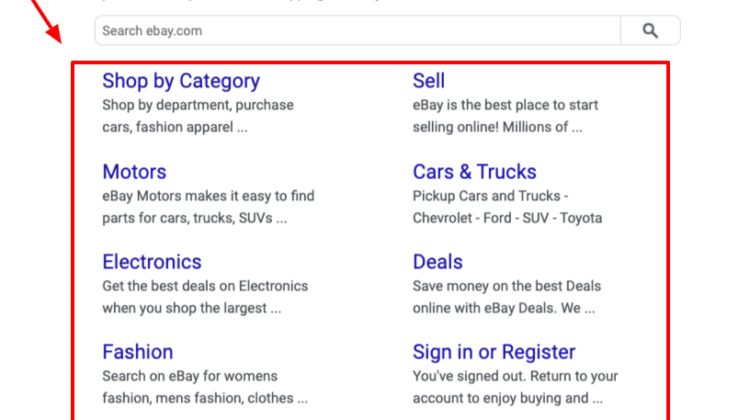
For anyone managing a website, the appearance of sitelinks beneath your main listing in Google search results is often a welcome sight. These additional links, pointing to specific internal pages, usually signify authority and help users navigate your site directly from the search engine. They are, in essence, Google’s automated way of predicting what a searcher might find most useful on your domain. However, what happens when these automatically generated sitelinks don’t quite hit the mark? Perhaps an outdated promotions page is showing, or an irrelevant ‘About Us’ section overshadows crucial product pages. The good news for webmasters is that while Google’s algorithms largely dictate sitelink selection, there are straightforward SEO methods you can employ to influence their display, effectively demoting unwanted ones and promoting desired alternatives.
Understanding Google Sitelinks: An Algorithmic Dance
Before diving into methods of influence, it’s vital to grasp how Google generates sitelinks. Unlike manually created ad extensions, organic sitelinks are entirely algorithm-driven. Google analyzes a website’s structure, content, internal linking, and user behavior to determine which pages are most relevant and useful to a search query. They typically appear for branded searches (e.g., searching for “your company name”) and are designed to enhance user experience by offering shortcuts to key sections of your site. While Google previously offered a direct “demote sitelink” option within Google Search Console, this feature was retired years ago. Today, the approach is more holistic, requiring webmasters to signal their preferred site structure and content hierarchy through best SEO practices.
Why Demote a Sitelink? Common Scenarios
The desire to alter sitelinks stems from various practical needs:
- Outdated Content: A promotional landing page from last year, or an old blog post that no longer reflects current offerings, might still appear.
- Irrelevant Pages: Google might highlight a contact page when users are likely seeking product information.
- Temporary Content: Pages related to short-term events or campaigns that are no longer active can clutter search results.
- Duplicate Content Issues: Sometimes, different versions of a page might appear, causing confusion.
- Branding and Messaging: You might want to control the narrative by ensuring only specific, high-priority pages are highlighted.
In all these cases, influencing sitelinks is about refining how your website is perceived and interacted with directly from Google Search.
Strategy One: Master Your Internal Linking Structure
One of the most powerful signals you send to Google about the importance of your pages is through your internal linking structure. Think of internal links as votes of confidence from one page on your site to another. Pages with more internal links, especially from important, high-authority pages, signal greater relevance and value to search engines.
- Strengthen Links to Key Pages: Identify the pages you want to appear as sitelinks. Ensure these pages are linked frequently from your homepage, main navigation, and other relevant, authoritative pages across your site. Use descriptive and relevant anchor text for these links.
- Weaken Links to Undesired Pages: Conversely, if a page you don’t want as a sitelink is heavily linked internally, consider reducing its prominence. This doesn’t mean removing all links, but rather ensuring it’s not receiving an excessive amount of internal link juice compared to truly important pages. Review your main navigation; if an unwanted page is there, consider moving it to a less prominent section or removing it if appropriate.
- Contextual Linking: Beyond navigation, weave links to your most important content naturally within your blog posts and other informational pages. This reinforces their authority and relevance.
A well-organized internal linking strategy not only helps Google understand your site’s hierarchy but also improves user navigation, contributing to a better overall site experience.
Strategy Two: Optimize Page Titles and Meta Descriptions
Your page titles (the HTML <title> tag) and meta descriptions provide crucial information to Google about the content of each page. While they don’t directly “demote” a sitelink, they play a significant role in Google’s understanding of a page’s purpose and relevance, which in turn influences sitelink selection.
- Clarity and Conciseness: Ensure your titles and descriptions accurately and uniquely describe the content of each page. Avoid generic or duplicate titles.
- Keyword Relevance: Incorporate relevant keywords in your titles and descriptions, especially for the pages you want to promote. This helps Google connect the page to specific user queries.
- Call to Action/Purpose: For pages you want highlighted, use meta descriptions to clearly communicate their value or purpose. This makes them more appealing to both users and search algorithms.
By optimizing these elements, you effectively guide Google towards recognizing the most important and descriptive pages on your site.
Strategy Three: Leverage Google Search Console (Carefully)
While the direct “demote sitelink” feature is gone, Google Search Console (GSC) remains an indispensable tool for understanding and influencing how Google sees your site. It provides insights into indexation, crawl errors, and overall site health, all of which indirectly impact sitelinks.
- URL Removal Tool: If a page appearing as a sitelink is truly outdated, broken, or needs to be removed from Google’s index temporarily, the URL Removal Tool in GSC can be used. This is a temporary measure (typically 6 months) and aims to remove the page from search results entirely, which would prevent it from being a sitelink. For permanent removal, you’d need to block the page with a noindex tag or delete it.
- Disavow Tool (Rarely for Sitelinks): The Disavow Tool is primarily for signaling to Google that you don’t endorse specific spammy backlinks pointing to your site. It’s generally not used for sitelink management. However, if a sitelink points to a page suffering from severe negative SEO involving spammy links, disavowing those links could indirectly improve the page’s standing or allow Google to re-evaluate its importance. This is an advanced technique and should be used with extreme caution.
- Sitemap Submission: Ensure your XML sitemap is up-to-date and submitted to GSC. This helps Google efficiently crawl and understand your site’s structure, focusing its attention on the pages you deem most important.
Regularly monitoring your site’s performance in GSC provides critical data to inform your sitelink influencing strategies. For broader insights on managing your web presence, industry publications often discuss significant Google algorithm changes that affect how sites are indexed and ranked.
Strategy Four: Content Quality and Relevance
Ultimately, Google wants to provide users with the most relevant and high-quality content. If a page appears as a sitelink, it’s because Google perceives it as highly relevant to the main query. To influence sitelinks, ensure the pages you want to be highlighted are genuinely excellent:
- High-Quality Content: Produce comprehensive, accurate, and engaging content on your target pages.
- User Engagement: Pages that receive high user engagement (low bounce rate, long time on page) signal value to Google.
- Regular Updates: Keep your content fresh and updated, especially for evergreen pages you wish to feature.
Strategy Five: Canonicalization and Noindexing (Use with Caution)
These are more advanced methods that can indirectly impact sitelinks:
- Canonical Tags: If you have multiple versions of a page (e.g., with different URL parameters), ensure you use canonical tags to tell Google which is the preferred version. This prevents Google from picking a less optimal version as a sitelink.
- Noindex Tag: For pages that absolutely should not appear in search results (like thank-you pages, administrative sections, or private content), use a
<meta name="robots" content="noindex">tag. This will prevent Google from indexing the page, and by extension, from ever listing it as a sitelink. This should be used very carefully, as it removes the page from search entirely.
The Holistic Approach to Sitelink Management
Influencing Google sitelinks is less about direct control and more about effective communication with search engines. By meticulously optimizing your internal linking, crafting clear and compelling page titles and meta descriptions, leveraging Google Search Console for insights, and focusing on overall content quality, you send strong signals to Google about which pages are most important. This holistic approach ensures that your sitelinks accurately reflect your site’s priorities, guiding users to the most valuable parts of your online presence and enhancing your visibility in search results.
In today’s dynamic SEO landscape, continuous monitoring and adaptation are key. Regular audits of your site’s structure and performance will help you maintain control over your digital footprint, including those highly coveted, or sometimes confounding, Google sitelinks.