SEO for Firefox Toolbar Best Tools for Website Analysis
In today’s competitive online world, a strong digital presence is no longer just an advantage; it is a necessity. For businesses and individuals aiming to connect with their audience, appearing prominently in search engine results is paramount. This is where Search Engine Optimization, or SEO, plays a critical role. SEO is the practice of optimizing your website to rank higher in search engines, thereby increasing visibility and driving organic traffic. A fundamental component of any successful SEO strategy involves thorough website analysis – understanding what is working, what is not, and where opportunities lie. While many platforms offer sophisticated desktop software, the convenience and efficiency of browser-based tools, particularly within the Firefox ecosystem, offer a powerful and accessible alternative for daily tasks. These toolbar extensions transform your browser into a potent analytical workstation, providing immediate insights without the need to navigate away from the page you are examining. For those dedicated to maintaining and improving their website’s performance, leveraging these tools can simplify complex data, making informed decisions easier and quicker to implement. Effective digital marketing strategies increasingly rely on such real-time data interpretation.
Why Firefox for SEO Analysis?
Mozilla Firefox has long been a favorite among web developers and SEO professionals alike, and for good reason. Its open-source nature fosters a robust community of developers constantly creating and refining extensions that cater to a wide range of needs. This extensibility is a major draw, allowing users to customize their browsing experience to an unparalleled degree. Unlike some other browsers, Firefox often prioritizes user privacy and control, which, while not directly an SEO benefit, contributes to a more secure and adaptable environment for analysis. Its consistent performance across various operating systems and its dedicated developer tools also make it a reliable platform for deep dives into website architecture and content. The ease of installing and managing these toolbar extensions means that critical SEO data is always just a click away, integrated seamlessly into your browsing workflow. This integration saves valuable time and streamlines the analytical process, allowing for quick checks and more detailed investigations whenever necessary.
Key Categories of Firefox SEO Tools
When approaching website analysis through Firefox extensions, it is helpful to categorize the available tools based on their primary function. Broadly, these tools can be grouped into several key areas: on-page SEO analysis, technical SEO insights, competitor analysis and keyword research, and performance monitoring. Each category addresses a different facet of website optimization, and a comprehensive strategy often requires employing tools from each. Understanding these distinctions helps in selecting the most appropriate tools for specific tasks and prevents information overload. Instead of installing every available extension, a targeted approach ensures you have the necessary information at your fingertips without cluttering your browser or slowing down your system.
On-Page SEO Analysis Tools for Firefox
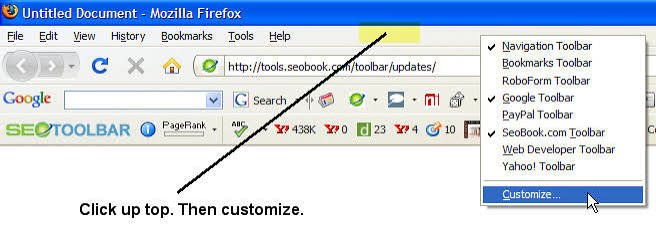
On-page SEO refers to all the optimizations you can make directly on your website to improve its search engine ranking. Firefox offers several excellent toolbar extensions that provide instant data about a page’s on-page elements. Tools like SEO Quake, for instance, overlay a wealth of information directly onto search results and individual pages. With a single click, you can view a page’s title tag, meta description, heading structure (H1, H2, etc.), keyword density, and internal and external link counts. The MozBar is another highly popular extension that displays Page Authority and Domain Authority metrics, along with other SEO elements as you browse. These tools are invaluable for quickly assessing whether a page is optimized for its target keywords, if its content is well-structured, and if it adheres to best practices for user experience. They allow you to identify opportunities for improvement in your own content or spot areas where competitors might be outperforming you based on their on-page efforts.
Technical SEO Insights via Firefox Extensions
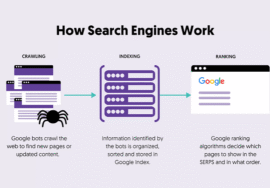
Beyond content, the technical foundation of your website significantly impacts its search engine performance. Firefox extensions can provide crucial insights into these often-overlooked aspects. Tools that check for broken links are essential, as dead links can harm user experience and signal neglect to search engines. Extensions like Link Checker can quickly scan a page for broken internal and external links, highlighting them for immediate action. Another critical area is understanding how search engines crawl and index your site. While not directly a toolbar, the User-Agent Switcher extension allows you to simulate different user agents (like Googlebot), which can be useful for debugging specific crawling issues. Extensions that help visualize internal linking structures or identify redirect chains can also be incredibly beneficial. For instance, redirect path checkers can trace HTTP redirects, ensuring that search engines and users are correctly guided to the intended content without unnecessary hops, which can impact page load times and search engine algorithms. These technical checks are vital for maintaining a healthy and crawlable website.
Competitor Analysis and Keyword Research Tools
To truly excel in SEO, you need to understand your competitive landscape and identify the keywords that matter most to your audience. Many leading SEO platforms offer companion Firefox extensions that provide quick access to their data while you browse. For example, extensions from SEMrush or Ahrefs, even for users without full subscriptions, often provide high-level metrics like domain rating, organic traffic estimates, and top keywords for any site you visit. This immediate access allows for on-the-fly competitor analysis, giving you a snapshot of their performance and potential strategies. Furthermore, keyword research extensions can help you uncover related keywords, long-tail variations, and search volumes directly within your browser. As you visit relevant sites or search for topics, these tools can suggest additional keywords or show you what terms a competitor is ranking for. This ability to gather competitive intelligence and refine your keyword strategy in real-time is a powerful asset for any SEO professional.
Performance Monitoring and User Experience
Website performance and user experience (UX) are increasingly important ranking factors. Google’s Core Web Vitals, for example, directly measure aspects of loading speed, interactivity, and visual stability. Firefox provides built-in developer tools that include robust performance analysis features, allowing you to inspect network requests, JavaScript execution, and rendering performance. Beyond the native tools, extensions can simplify and highlight specific performance metrics. While dedicated page speed tools often operate outside the browser, extensions can provide quick indicators of a page’s health. For instance, tools that measure Time to First Byte or visually represent layout shifts can help identify immediate areas for improvement. Ensuring your website loads quickly and provides a smooth, stable experience for users is not just good for rankings; it is fundamental to retaining visitors and achieving conversion goals. Fast loading times directly impact bounce rates and user satisfaction, making these tools indispensable.
Choosing the Right Tools for Your Strategy
Given the abundance of Firefox SEO extensions, choosing the right set of tools can feel daunting. The best approach is to identify your specific SEO goals and the aspects of your website that require the most attention. Are you focused on content optimization? Technical health? Competitive research? Start with a few well-regarded extensions that cover your primary needs. Avoid cluttering your browser with too many tools, as this can slow down performance and create unnecessary distractions. Read reviews, check update frequency, and consider how well each tool integrates with your existing workflow. Often, a combination of one or two comprehensive tools and a few specialized ones for niche tasks provides the most balanced and effective setup. Experimentation is key to finding what truly works best for your individual SEO journey.
Integrating Tools for a Comprehensive Approach
The true power of Firefox SEO tools comes not from using them in isolation, but from integrating their insights into a comprehensive strategy. For example, you might use an on-page analysis tool to identify content gaps, then a keyword research tool to find relevant terms to fill those gaps. Subsequently, a technical SEO tool could confirm that the new content is crawlable and indexable, while a performance tool ensures it loads quickly. This synergistic approach allows you to build a holistic picture of your website’s health and performance. Regularly reviewing the data from your chosen extensions and cross-referencing findings helps you make more informed decisions, prioritize tasks effectively, and track the impact of your SEO efforts over time. A layered strategy, combining various data points, leads to more sustainable and impactful improvements in your search engine rankings and overall online presence.
Conclusion: Empowering Your SEO Journey with Firefox
The landscape of Search Engine Optimization is constantly evolving, making continuous monitoring and analysis indispensable. Firefox, with its rich ecosystem of robust and accessible toolbar extensions, offers a powerful platform for conducting detailed website analysis without needing expensive software or complex configurations. From scrutinizing on-page elements and uncovering technical issues to analyzing competitors and ensuring optimal performance, these tools provide journalists, marketers, and webmasters with the immediate data needed to make informed decisions. By strategically selecting and integrating these valuable resources, you can transform your browser into an efficient SEO command center. This empowers you to stay ahead in the digital race, drive more organic traffic, and ultimately achieve your online objectives. Embracing Firefox’s SEO toolkit is a strategic move for anyone serious about improving their website’s visibility and success in the competitive online world.